Your Data, Protected at Every Layer
Built for the most demanding enterprise environments with security-first architecture, comprehensive audit trails, and flexible deployment options that meet the strictest regulatory requirements. From RBAC to air-gapped deployment, Docmet is engineered for trust.
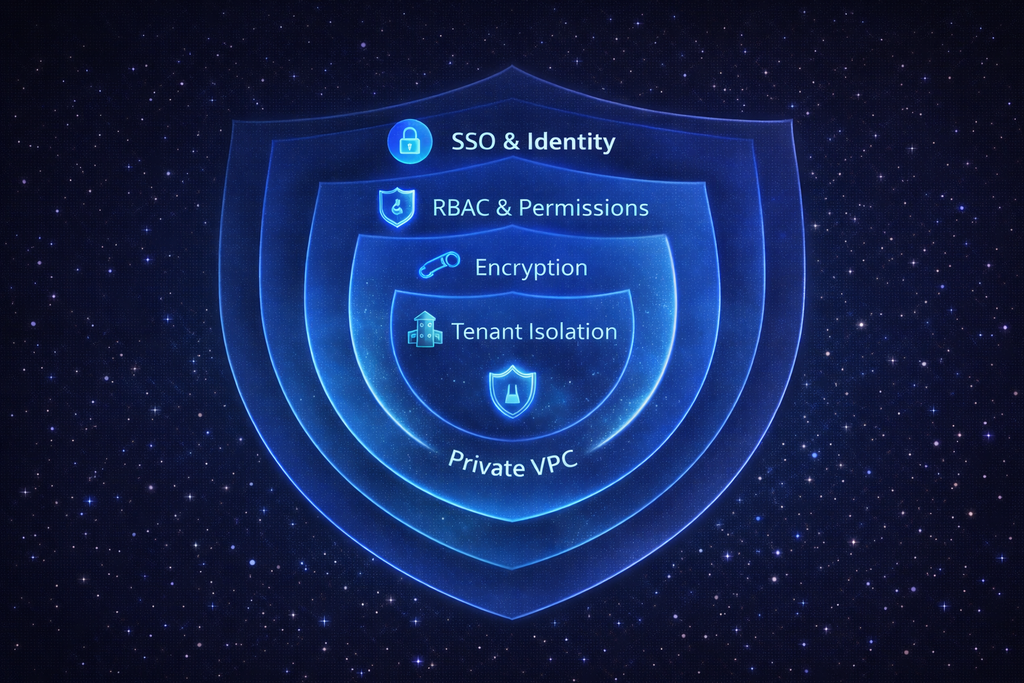
Why Traditional Security Isn't Enough
AI introduces new attack surfaces and compliance risks that traditional security models don't address. Enterprise AI requires purpose-built security architecture.
🌐 Proprietary Data in Public APIs
Employees paste sensitive data into ChatGPT or Claude, unknowingly sending trade secrets to third-party servers. Data may be retained, logged, or used for training. Legal and HR violations are common.
🔓 Broad Permissions, Exposed Data
Traditional document systems have coarse permissions (view/edit entire folder). AI search can surface sensitive documents users shouldn't access. "Search all contracts" might reveal executive compensation or acquisition plans to unauthorized employees.
📜 Black Box AI Reasoning
When AI makes a recommendation (e.g., "Approve this budget"), there's no record of WHY. Compliance auditors need full provenance: what data was accessed, what logic was applied, who approved.
⚠️ Sensitive Data in Responses
AI retrieves HR records containing SSNs, medical data, or salary info and includes it in answers. Even with good intent, this violates GDPR, HIPAA, or CCPA if the requesting user isn't authorized.

Six Layers of Enterprise Protection
Security isn't a feature—it's foundational. Every component of Docmet's architecture is designed with security as the primary requirement.
🔐 Enterprise SSO Integration
Supported Providers: Okta, Azure AD, Google Workspace, Ping Identity, OneLogin, SAML 2.0 generic. Features: Single Sign-On (eliminate separate passwords), Multi-Factor Authentication (MFA) enforcement, Just-In-Time (JIT) user provisioning, automatic de-provisioning on employee termination. **Result:** Your identity provider remains source of truth. Docmet users are always in sync with HR systems.
👥 Granular Permission Model
Hierarchy: Users belong to Teams, Teams are assigned Roles, Roles grant Permissions at Space/Folder/Page level. Permissions: Read, Write, Share, Delete, Admin. Enforcement: RBAC is enforced in the backend RBACManager service—not just UI. AI agents cannot retrieve documents the user lacks permission to access. Example: Legal Team role can read Legal Space, HR Team cannot. CEO role can read everything.
🔒 Encryption at Rest & In Transit
In Transit: TLS 1.3 for all API communication. Certificate pinning for mobile apps. At Rest: AES-256 encryption for all data in PostgreSQL and Azure Blob Storage. Customer-managed encryption keys (CMEK) available for Enterprise. Vector Embeddings: Encrypted in Qdrant. Backups: Encrypted and geo-replicated.
🏢 Logical & Physical Data Separation
Every customer gets a unique Tenant ID. Vector Database: Separate collections per tenant in Qdrant—vectors for Company A are mathematically invisible to Company B. PostgreSQL: Row-Level Security (RLS) enforces tenant filtering on all queries. Media Storage: Separate Azure Blob containers per tenant with isolated access keys. Result: Zero risk of cross-tenant data leakage.
🔒 Automated Compliance Agent
Before any document text is sent to the LLM, the Compliance Agent scans for: Pattern-Based: SSNs (regex), Credit Cards (Luhn algorithm), Phone Numbers, Email Addresses, IP Addresses. ML-Based: Names, Addresses, Medical Records, Salary Data (using fine-tuned NER models). Action: Sensitive data is replaced with tokens (e.g., `[SSN_REDACTED]`, `[EMAIL_MASKED]`). Original data is logged (encrypted) for audit but never shown to unauthorized users or sent to LLMs.
📋 Immutable Activity Logging
Every action is logged: User Events: Login, logout, password reset, permission change. Data Access: Document viewed, file downloaded, page edited, deleted. AI Queries: Full query text, retrieved documents, reasoning steps, generated response, confidence scores. Approvals: Who approved what, when, with what justification. Logs Include: Timestamp (UTC), User ID, IP Address, Session ID, Action Type, Affected Resource. Storage: Write-only append log (cannot be altered). Retention: Configurable (default 7 years). Export: Stream to Splunk, Datadog, Elasticsearch via API.

From Cloud to Air-Gapped
Choose the deployment model that matches your security requirements—from fully managed SaaS to completely isolated on-premise infrastructure.
☁️ Fully Managed SaaS
Infrastructure: Shared Kubernetes cluster on Azure (US East region, optionally EU West for GDPR). Isolation: Logical tenant separation (dedicated DB schemas, vector collections). Best For: SMBs and departments within larger enterprises. Setup Time: Instant (self-service signup). Pricing: Starter/Growth plans. Compliance: SOC2, GDPR, privacy shield.
🏢 Dedicated Private Cloud
Infrastructure: Dedicated Kubernetes cluster in your AWS or Azure subscription (Virtual Private Cloud). Isolation: Physical tenant separation—your data never touches shared infrastructure. Best For: Regulated industries (Finance, Healthcare) requiring data residency. Setup Time: 2-4 weeks. Pricing: Business plan + VPC add-on. Features: Custom VPC peering, private endpoints, dedicated IP addresses, customer-managed encryption keys.
🔒 Fully Isolated Deployment
Infrastructure: Dockerized Docmet stack deployed on your on-premise servers or private cloud (no internet access). **Isolation:** Complete air-gap—data never leaves your data center. Best For: Government, defense, highly regulated industries with zero-trust mandates. Setup Time: 6-8 weeks (includes infrastructure setup and security review). Pricing: Enterprise plan + on-premise license. Features: Self-hosted LLMs (Llama 3, Mistral), local vector database, offline documentation.
🌐 Cloud + On-Premise Hybrid
Architecture: Sensitive data (HR, Finance) stays on-premise. General knowledge (marketing, engineering docs) in cloud. Synchronization: Unidirectional sync (cloud cannot pull from on-premise, only push). Best For: Large enterprises with mixed data sensitivity levels. Setup: Custom architecture design required. Pricing: Enterprise plan, custom pricing.

Built to Meet Global Standards
Regulatory Compliance
✅ Service Organization Control 2
Status: Audit in progress, completion Q2 2026. Scope: Security, Availability, Confidentiality, Processing Integrity. Controls: 200+ control objectives across infrastructure, access management, change management, incident response. Annual Re-Audit: Required to maintain certification. Customer Access: SOC2 report provided under NDA to qualified prospects.
🇪🇺 General Data Protection Regulation
Capabilities: Data Processing Agreements (DPA) with all customers. Right to be Forgotten (delete user data on request). Data Portability (export all data in structured format). Breach Notification (within 72 hours). Data Minimization (collect only necessary data). Data Residency: EU customers can choose EU-West region for data storage. Subprocessors: Published list of all third-party services.
🏥 Health Insurance Portability and Accountability Act
Eligibility: Available for Business plan + HIPAA BAA. Features: PHI (Protected Health Information) detection and masking. Encrypted storage and transmission. Access logs for all PHI. Role-based access to medical records. Requirements: Customer must configure RBAC to restrict PHI access. Use Case: Healthcare providers managing patient records and clinical documentation.
🔐 Information Security Management
Status: Roadmap for 2026. Scope: Information security management system (ISMS) covering all aspects of data handling. Benefits: Demonstrates systematic approach to managing sensitive data. Required by many enterprise procurement processes.
🇺🇸 California Privacy Rights
Capabilities: User data deletion on request. Opt-out of data sales (we don't sell data). Transparency reports on data usage. Right to know what data is collected. Applicability: Automatically compliant—our practices exceed CCPA requirements.

Security Controls Deep Dive
Role-Based Access Control (RBAC)
Permission Model
Docmet implements a hierarchical permission model:
Hierarchy:
Organization
├─ Teams (e.g., "Legal Team", "Finance Team")
│ ├─ Roles (e.g., "Legal Analyst", "Legal Admin")
│ │ ├─ Permissions (Read, Write, Delete, Share, Admin)
│ │ │ ├─ Scope: Spaces, Folders, Pages, Media
Example Configuration:
- Legal Analyst: Permissions - Read, Write; Scope - Legal Space only
- Legal Admin: Permissions - All permissions; Scope - Legal Space only
- Finance Viewer: Permissions - Read only; Scope - Finance Space only
- CEO: Permissions - All permissions; Scope - All Spaces (global)
- HR Manager: Permissions - Read, Write, Share; Scope - HR Space + Employee onboarding docs
Enforcement Points
RBAC is enforced at multiple layers:
- API Gateway: Checks user permissions before allowing request to proceed
- RBACManager Service: Dedicated service validates all data access operations
- Database (Row-Level Security): PostgreSQL RLS ensures queries only return authorized rows
- AI Agents: The Retriever Agent filters search results by user permissions—documents the user cannot access are excluded from results
- Media Downloads: File download URLs are signed with user permissions, expire after 1 hour
Permission Inheritance
- Permissions set at Space level cascade to all Folders and Pages within
- Explicit permissions at Folder level override Space permissions
- Page-level permissions are most specific (override Folder and Space)
Dynamic Teams
Teams can be dynamically managed:
- Active Directory Sync: Teams auto-sync with AD groups (e.g., "Sales Team" AD group → "Sales Team" in Docmet)
- JIT Provisioning: Users added to teams automatically on first login based on SAML attributes
- Offboarding: User removed from AD → automatically loses all Docmet access within 5 minutes
Automated Sensitive Data Protection
Four-stage process ensures no sensitive data reaches unauthorized users or LLMs
Document Ingestion & Scanning
When a document is uploaded, the Compliance Agent scans the text using pattern-based regex (SSN: \d{3}-\d{2}-\d{4}, Credit Card: Luhn algorithm) and ML-based NER models trained on PII datasets. Detected entities are flagged with type and confidence score.
Entity Tagging & Sensitivity Classification
Each detected PII entity is tagged (e.g., [SSN:123-45-6789], [EMAIL:[email protected]], [PHONE:555-1234]). Entities are classified by sensitivity level: High (SSN, Credit Card), Medium (Email, Phone), Low (Names). Sensitivity determines masking and access rules.
Access Control, Masking & Audit Logging
Before content is shown to a user or sent to an LLM, access rules are enforced. Authorized users (e.g., HR Admin) see original values; unauthorized users see masked tokens (e.g., [SSN_REDACTED], [EMAIL_MASKED]). Original values are stored encrypted, and every access attempt is logged with user, PII type, masking outcome, timestamp, and justification to support compliance audits.

Proactive Threat Detection
Continuous Security Monitoring
🚨 Anomaly Detection
Machine learning models monitor for suspicious activity: Unusual access patterns (user accessing 1000 docs in 5 minutes), off-hours logins, geo-location anomalies (login from new country), privilege escalation attempts. Alerts sent to security team Slack channel and email.
🔍 Continuous Security Assessments
Automated Scans: Weekly automated vulnerability scans of infrastructure (Kubernetes, containers, dependencies). Penetration Testing: Annual third-party pen tests. Dependency Audits: Daily checks for CVEs in npm packages, Python libraries. Patch Management: Critical patches deployed within 48 hours, routine patches within 7 days.
📞 Rapid Response Protocol
Detection: Automated alerts trigger incident response. Containment: Affected tenants isolated within 15 minutes. Investigation: Security team investigates root cause. Notification: Customers notified within 24 hours (GDPR: 72 hours). Remediation: Patch deployed, systems restored. Post-Mortem: Detailed incident report shared with affected customers.
👁️ 24/7 Monitoring
Coverage: Business plan includes 24/7 SOC monitoring (outsourced to certified SOC provider). **Metrics:** Mean Time to Detect (MTTD) < 5 minutes, Mean Time to Respond (MTTR) < 30 minutes. **Communication:** Dedicated Slack channel for security alerts.
Data Lifecycle Management
Data Governance Policies
Data Classification
All data in Docmet is classified into three categories:
- Public: Marketing materials, public documentation (no encryption required)
- Internal: General business documents (encrypted at rest)
- Confidential: Legal contracts, HR records, financial data (encrypted + access-controlled + audit-logged)
Retention Policies
Default Retention:
- Active Documents: Retained indefinitely while organization subscription active
- Deleted Documents: Moved to "Trash" for 30 days (recoverable), then permanently deleted
- Audit Logs: Retained 7 years (GDPR/SOX compliance requirement)
- Vector Embeddings: Deleted when source document deleted (within 24 hours)
Custom Retention (Enterprise Plan):
- Define retention policies per Space (e.g., Legal: 10 years, Marketing: 2 years)
- Automated deletion based on document age or last access date
- Legal hold capability (prevent deletion for active litigation)
Right to be Forgotten (GDPR)
User Data Deletion:
Upon user account deletion request:
- User profile deleted immediately
- Audit logs anonymized (replace user ID with [DELETED_USER])
- Documents authored by user remain (ownership transferred to admin)
- Email/SSO credentials purged from all systems
Tenant Data Deletion:
Upon organization account cancellation:
- All documents, embeddings, graph data deleted within 7 days
- Backups purged within 30 days (for disaster recovery window)
- Deletion certificate provided
Shared Responsibility Model
🔑 Enforce MFA and Complex Passwords
Recommendation: Require MFA for all users (enforce in your SSO provider). Use password managers (1Password, LastPass). Rotate admin passwords every 90 days. Docmet Enforcement: We enforce 12+ character passwords with complexity requirements. SSO bypasses passwords entirely (recommended).
🎯 Grant Minimum Necessary Permissions
Recommendation: Don't give everyone "Admin" role. Create specific roles (Viewer, Editor, Admin) and assign based on job function. Review permissions quarterly. Example: Sales team should NOT have access to HR Space.
🔍 Audit User Permissions Quarterly
Recommendation: Export user-permission matrix from Docmet admin panel. Review for stale accounts (users who left company), excessive permissions (users with more access than needed). Remove inactive users. Automation: Set up JIT de-provisioning (users removed from AD → auto-removed from Docmet).
🏷️ Tag Documents by Sensitivity
Recommendation: Use Docmet's Tags feature to mark "Confidential", "Internal", "Public". Configure RBAC to restrict "Confidential" tags to specific teams. PII Detection: Let Compliance Agent auto-tag docs containing PII.
📊 Regular Security Reviews
Recommendation: Export audit logs monthly. Look for anomalies (off-hours access, bulk downloads, permission changes). Set up alerts for sensitive actions (admin role granted, documents deleted in bulk). Integration: Stream logs to your SIEM (Splunk, Datadog) for automated analysis.
Integration Security
Secure Integration Architecture
OAuth 2.0 for Integrations
All third-party integrations (Slack, Google Drive, Salesforce) use OAuth 2.0 authorization flow:
- User clicks "Connect Slack"
- Redirected to Slack authorization page
- User grants specific permissions (e.g., "Read messages", "Post messages")
- Slack returns authorization code to Docmet
- Docmet exchanges code for access token (stored encrypted)
- Access token used for API calls (never exposed to user)
Security Features:
- Tokens encrypted at rest using AES-256
- Tokens scoped to minimum necessary permissions
- Tokens revocable (user can disconnect anytime)
- Automatic token refresh (prevents expiration issues)
Data Flow Constraints
Google Drive Integration Example:
- Docmet requests read-only access to Google Drive files
- User explicitly grants access via Google's consent screen
- Docmet can read files user shares, but cannot delete or modify
- Files are indexed but NOT stored permanently (only embeddings stored)
- User can revoke access anytime from Google Account settings
Subprocessor List
We use the following third-party services (all SOC2 certified):
- Azure: Purpose - Infrastructure hosting; Data Shared - Encrypted documents, metadata; Location - US-East / EU-West
- OpenAI: Purpose - LLM processing; Data Shared - Masked document text (no PII); Location - US
- Qdrant Cloud: Purpose - Vector database; Data Shared - Embeddings (no raw text); Location - Dedicated tenant
- Stripe: Purpose - Payment processing; Data Shared - Billing info (no document data); Location - US
- SendGrid: Purpose - Email delivery; Data Shared - Email addresses (transactional only); Location - US
Customer Approval: Enterprise customers can request subprocessor approval process (we notify 30 days before adding new service).
Continuous Security Innovation
Future Security Enhancements
🔒 Q2 2026
Implement continuous authentication (re-verify user identity every 15 minutes), device posture checking (require managed devices), network segmentation (isolate AI services).
🔑 Q3 2026
Enterprise customers can provide their own encryption keys stored in AWS KMS or Azure Key Vault. We encrypt data with customer keys, giving them full control over decryption.
🛡️ Q4 2026
Deploy AI workloads in Azure Confidential VMs with Intel SGX enclaves. Ensures data is encrypted even during processing in CPU memory.
⛓️ 2027
Optional immutable audit log on blockchain (Hyperledger) for ultimate tamper-proof compliance evidence. Useful for regulated industries with strict audit requirements.
Enterprise Security Comparison
Docmet vs. Generic AI Tools
Security Built for Enterprise Trust
Schedule a security deep-dive with our CISO team. We'll walk through our architecture, compliance certifications, and answer your specific security questions.